
List your roadside assistance, towing or truck repair service and connect with drivers who need help right now.
Why List Your Business on MyTruckBrokeDown
Thousands of truck drivers search online every day for emergency roadside help.
Our platform connects them directly with service providers like you.
Reach drivers when they need help most
Truck drivers searching for roadside assistance can quickly find your service.
Increase your online visibility
Your business appears in search results and in our directory listings.
Your business appears in search results and in our directory listings.
Targeted audience
Only truck drivers and logistics companies searching for roadside services.
Only truck drivers and logistics companies searching for roadside services.
Grow your service business
More visibility means more calls and more customers.
More visibility means more calls and more customers.
1. Create your listing
Add your business details, services and contact information.
Add your business details, services and contact information.
2. Appear in the directory
Your company becomes visible to truck drivers searching for help.
Your company becomes visible to truck drivers searching for help.
3. Receive service requests
Drivers contact you directly by phone or email.
Drivers contact you directly by phone or email.
Your Business Listing Includes
- Business profile page
- Service categories (towing, repair, roadside assistance)
- Map location
- Contact information
- Work hours
- Images and company details
- Direct calls from truck drivers
Example Listing
Your listing will look similar to this
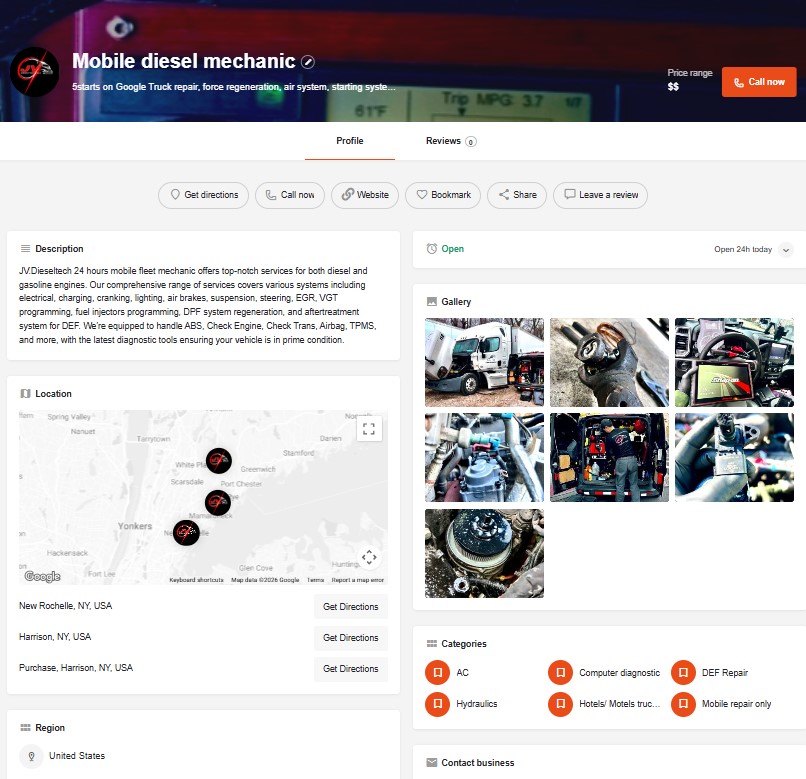
How to Add a Listing
Follow these steps to add a listing with detailed information about your business or service:
We at My Truck Broke Down (“My Truck Broke Down”) are committed to respecting your online privacy and recognize your need for appropriate protection and management of any personally identifiable information (“Personal Information”) you share with us.
My Truck Broke Down has established this Online Privacy Policy so that you can understand the care with which we intend to treat your Personal Information.
Personal Information means any information that may be used to identify an individual, including, but not limited to, a first and last name, a home or other physical address, and an email address or other contact information, whether at work or at home, as well as any other information about that individual.
THIS ONLINE PRIVACY POLICY MAY BE AMENDED BY US AT ANY TIME OR FROM TIME TO TIME, WITHOUT SPECIFIC NOTICE TO YOU. THE LATEST ONLINE PRIVACY POLICY WILL BE POSTED ON THIS WEBSITE (AND APPROPRIATELY DATE-STAMPED), AND YOU SHOULD REVIEW ANY AMENDED ONLINE PRIVACY POLICY PRIOR TO RE-USING THIS WEBSITE. WHETHER OR NOT YOU REVIEW THIS ONLINE PRIVACY POLICY, IN ITS INITIAL OR ANY AMENDED VERSION, YOU WILL BE BOUND BY ITS TERMS.
- Title: Choose a unique and descriptive title for your listing.
- Tagline: Add a catchy tagline that grabs attention and briefly explains your service or business.
- Description: Provide a detailed description of your business or service. Include key details such as what you offer, special features, and why customers should choose you.
- Logo: Upload your logo. Make sure it’s a clear and recognizable image that represents your brand. (Max file size: 1 MB)
- Cover Image: This is the primary image displayed on your listing page. Choose an attractive and high-quality image. (Max file size: 1 MB)
- Gallery Images (optional): You can upload additional images to showcase your products, services, or location. (Max file size: 1 MB)
- Email: Enter your email address so potential clients can reach out to you.
- Phone Number: Provide your phone number for further contact.
- Website (optional): If you have a website, include its URL for more information.
- Social Networks (optional): Add links to your social media profiles to increase engagement and visibility.
Specify your business hours for each day of the week:
- Mon-Sun: Enter your opening and closing hours for each day.
- Open 24/7: Select this option if your business is open 24/7.
- Closed: Choose this if your business is closed on a specific day.
- By appointment only: If your service operates by appointment only, select this option.
- Copy schedule to other days: Use this to apply the same working hours to multiple days.
- Select the appropriate timezone for your business, so customers see the correct working hours.
- Location: Enter the city or location where your business is based (e.g., “New York”).
- Lock Pin Location: Manually set the coordinates of your location on the map.
- Map marker pin: Drag and drop the pin to mark your business on the map.
Choose categories that best describes your business or service. You can select from predefined categories or other relevant options.
Add Your Roadside Assistance Business Today
Start reaching truck drivers who need your services.
FAQ
Yes. As part of our launch promotion, listing your roadside assistance business is completely FREE until September 30, 2026.
During this period, all premium listing features are included at no cost.
After the promotion ends, additional advertising options may be introduced, but businesses that join early will already have their presence established on the platform.
Most listings are reviewed and approved within 24 hours.
Our team quickly checks each submission to ensure the information is accurate and relevant for truck drivers looking for roadside assistance.
Yes. Once your listing is published, you can log into your account at any time to update your business information, services, contact details, images, or working hours.
Keeping your listing updated helps drivers contact you more easily.
Truck drivers can contact your business directly through the contact information you provide in your listing.
This typically includes your phone number, email address, and website, allowing drivers to reach you immediately when they need roadside assistance.
Ready to get more roadside assistance calls? Add your business listing today.→
Trusted platform for roadside assistance services



List Your Roadside Assistance or Truck Repair Business
MyTruckBrokeDown is a specialized directory designed to connect truck drivers with reliable roadside assistance providers across the United States. Every day, professional drivers search online for emergency services such as truck towing, mobile truck repair, tire replacement, battery assistance, and other roadside solutions. By adding your business to our platform, you increase your visibility and make it easier for drivers to find and contact you when they need help most.
Our directory helps roadside assistance companies, towing services, mobile mechanics, and truck repair specialists reach a highly targeted audience. Unlike general business directories, MyTruckBrokeDown focuses specifically on services for trucks and commercial vehicles. This means your listing appears in front of drivers who are actively searching for roadside assistance, heavy-duty towing, trailer repair, tire services, and other emergency truck support.
Creating a listing allows your company to showcase important information about your services, including your location, service area, contact details, work hours, and available roadside assistance options. Drivers can quickly review your profile and contact you directly by phone or email when they require immediate help.
Our goal is to build a trusted network of roadside service providers that truck drivers can rely on during breakdowns and emergency situations. If your company offers truck towing, roadside repair, mobile maintenance, or other trucking support services, listing your business on MyTruckBrokeDown can help you reach more customers and grow your service network.